
Stats & achievements
Perch reads your Claude Code transcripts and turns them into a stats dashboard and a set of lifetime
achievements. Everything is worked out locally from the files in ~/.claude.
Open the stats dashboard
Section titled “Open the stats dashboard”Right-click the tray icon and choose Session stats…, or go to Settings → Session Stats → Open session stats….
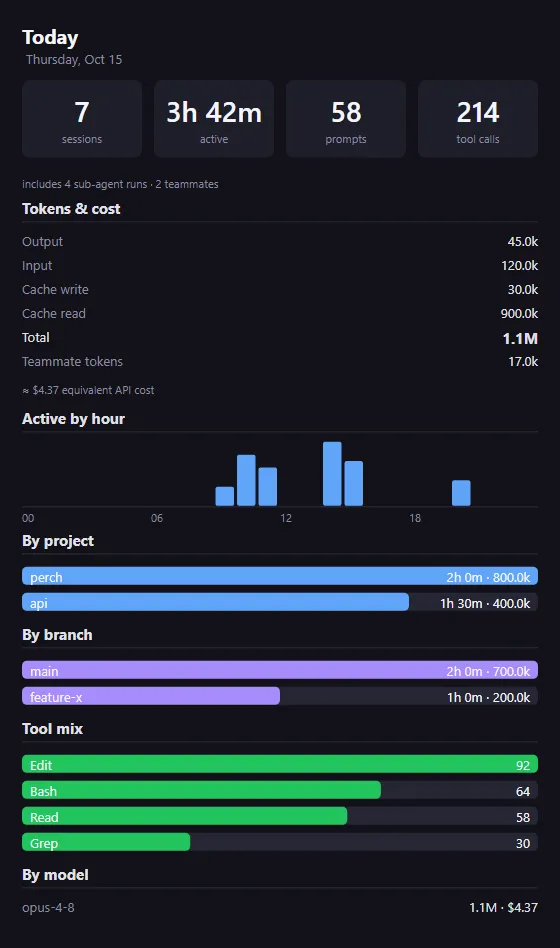
Pick a range from the toolbar: Today, 7 days, 30 days or All time.
What the dashboard shows
Section titled “What the dashboard shows”- Headline cards: sessions, active time, prompts and tool calls. A note underneath counts sub-agent runs and teammates when there are any.
- Records (7 days, 30 days and All time): the number of active days, your busiest day and your longest session. All time also shows your current streak of consecutive active days.
- Daily trend (7 days, 30 days and All time): active time per day.
- Tokens & cost: output, input, cache write, cache read and the total, plus teammate tokens when there are any. Below it, an estimated equivalent API cost.
- Active by hour: when in the day you worked.
- By project and By branch: active time and tokens for each. The branch list only appears when more than one branch was used.
- Tool mix: your most-used tools.
- By model: tokens and estimated cost for each model.
Active time
Section titled “Active time”Active time is estimated from the gaps between transcript records. A gap longer than the idle threshold (5 minutes by default) counts as you having stepped away, and is capped at the threshold. Change it with Active-time idle threshold.
Estimated cost
Section titled “Estimated cost”The cost figure is what the tokens would have cost at pay-as-you-go API prices, using built-in per-model rates. It is a measure of how hard you used Claude, not a bill: subscription usage is not charged per token. It reads “(partial)” when some models have no price, and you can hide it with Estimated cost.
Make a Wrapped poster
Section titled “Make a Wrapped poster”The Wrapped button on the stats toolbar turns the current range into a shareable poster. It is enabled once the range has at least one session.
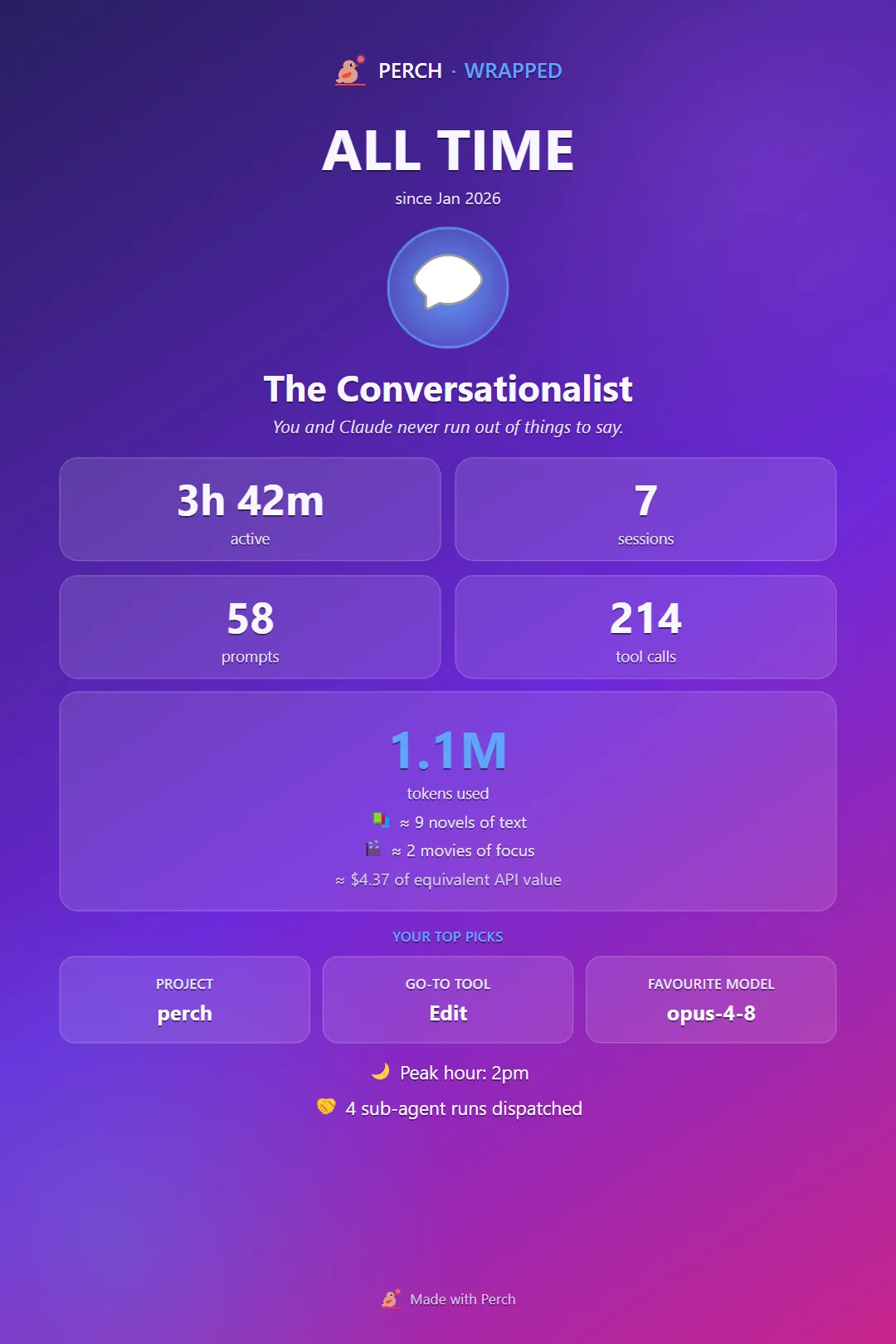
The poster shows a persona for how you work, your headline numbers, total tokens, your top project, tool and model, and your peak hour. The estimated cost is included only when Estimated cost is on. Click Copy image to put it on the clipboard or Save PNG… to save it.
Check the poster before you share it: it names your top project.
Achievements
Section titled “Achievements”Achievements are trophies earned from your lifetime Claude Code activity. They are worked out from your whole history, so they unlock retroactively: what you did before installing Perch already counts.
Open the trophy cabinet from the tray menu (Achievements…) or from Settings → Achievements → Open achievements…. A search box at the top filters the badges. The All time range of the stats dashboard also shows a compact version.
How badges work
Section titled “How badges work”- Badges are grouped by theme: Tokens, Activity, Tools, Collaboration, Rhythm and Whoops. Each group shows how many of its badges you have unlocked.
- Many badges have levels. For example, the sessions badge climbs from your first session up to 1,000 sessions, and the streak badge from a 3-day streak to a 100-day one. The tile shows your current level and a bar towards the next.
- Single badges show their goal, and a progress bar when there is a count to work towards.
- Badges come in bronze, silver and gold tiers.
- The spend badges only appear when Estimated cost is on.
What they cover, in general terms:
| Group | Examples of what counts |
|---|---|
| Tokens | Input, output and cached tokens, and reading more from cache than you send fresh |
| Activity | Sessions, prompts, active hours, streaks, active days, your longest session, equivalent spend |
| Tools | Total tool calls, how many different tools and model families you use, heavy use of one tool |
| Collaboration | Sub-agents, teammates, projects and branches |
| Rhythm | When in the day you work |
| Whoops | Prompts you cancelled and typed again |
When you unlock one
Section titled “When you unlock one”Perch checks for new unlocks when it starts and each time a session finishes.
- Crossing a gold-tier badge plays a full-screen card reveal. Up to three cards show side by side, with a “+N more” card for a bigger batch. Don’t show again on the card turns off Achievement reveal card.
- Achievement toasts also pops a desktop notification for each unlock, or one summary for a big batch. It is off by default.
On a fresh install, unlocks from your existing history are recorded quietly rather than celebrated, so they don’t cover the Quick Start.
Both celebrations count as playful extras, so Quiet mode holds them back while it is on.
Settings
Section titled “Settings”| Setting | What it does |
|---|---|
| Estimated cost | Shows the equivalent API cost in the stats window and on the Wrapped poster. |
| Active-time idle threshold | Gaps longer than this count as stepped away rather than active. |
| Achievement reveal card | Plays the full-screen card reveal when a gold-tier badge unlocks. |
| Achievement toasts | Also pops a desktop toast for each unlock. |